


How Corti's speech-to-text architecture works: choosing /transcribe, /streams, or /transcripts
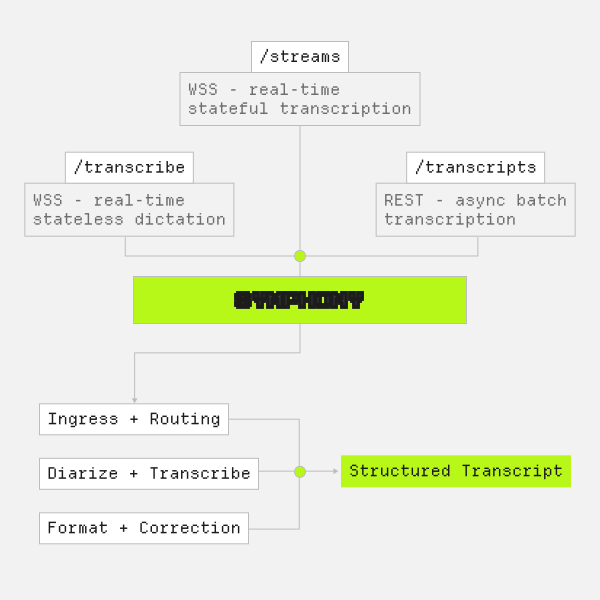
Corti's speech-to-text API uses three structurally distinct endpoints: /transcribe, /streams, and /transcripts, each built for a different class of clinical workflow. The differences between them go beyond feature toggles: they use different transport protocols, different state models, and different underlying speech processing pipelines. Selecting the right endpoint is one of the first architectural decisions to make when integrating clinical STT.
Overview
Before going into detail on each, it helps to see the structural differences in one place. All three endpoints share Corti's medical domain models and language support, but they diverge significantly in how audio gets from your application to a transcript.
- The
/transcribeendpoint is a real-time, stateless WebSocket connection designed for dictation and command-and-control workflows. -
/streamsis a real-time, stateful WebSocket connection designed for conversational transcription and clinical fact extraction. -
/transcriptsis a REST endpoint for batch audio file processing, operating synchronously up to a timeout and then asynchronously.
The stateless/stateful distinction matters in practice. A stateless connection means each WebSocket session is independent: there is no server-side interaction context being maintained between connections. A stateful connection means the server holds an interaction object across the lifecycle of the session, which is what enables /streams to accumulate conversational context and produce structured clinical outputs over time.
The /transcribe Endpoint
/transcribe is the dictation endpoint. It combines real-time speech-to-text with command-and-control capabilities, which makes it suited for EHR documentation, structured note capture, and any workflow where a clinician is speaking with the intent of producing a document rather than having a conversation.
The transport is WebSocket Secure (WSS) and the architecture is stateless, meaning you open a connection, stream audio, receive transcript segments, and close the connection without the server maintaining state between sessions. This is appropriate for dictation workflows because each dictation session is self-contained: the clinician speaks, the text is produced, and the session ends.
const config = {
  type: 'config',
  configuration: {
    primaryLanguage: 'en',
    automaticPunctuation: true,
    spokenPunctuation: false,
  },
};

ws.send(JSON.stringify(config));
Interim results are available on /transcribe: these are low-latency previews of in-progress transcript text that can be surfaced in the UI to give users visual confirmation that audio is being processed. Final results replace interim results as segments are confirmed by the model.
The command-and-control layer is what separates /transcribe from a generic STT stream. Commands can be defined to trigger application actions when recognized, such as inserting templates, navigating an EHR, or automating repetitive tasks, giving the dictation session control over the host application beyond text insertion. Command design is worth mapping before implementation: the set of commands that makes sense for a desktop EHR may differ from a mobile workflow, and some actions (delete range, navigate section, insert template) need to be defined at the application layer.
Read more in the commands documentation.
commands: [
  {
    id: 'delete_range',
    phrases: ['delete {delete_range}'],
    variables: [
      {
        key: 'delete_range',
        type: 'enum',
        enum: ['everything', 'the last word', 'the last sentence', 'that'],
      },
    ],
  },
];
Two dictation interaction patterns are supported:
- hold-to-talk, most common with handheld microphones, where recording is active only while a button is held
- toggle-to-talk, more common with wearable or desktop microphones, where the microphone is toggled on and remains active until explicitly turned off.
The choice between these affects how you structure the WebSocket lifecycle and how you handle interim-to-final segment transitions in your client. For both patterns, real-time audio capture is strongly recommended over buffered approaches: live audio allows the application to surface Corti's Audio Health events, which flag low-quality audio mid-session so providers can correct it in the moment rather than discovering the issue after the fact.
Read more in the dictation implementation guide.
Punctuation on /transcribe can be handled two ways:
-
spokenPunctuation: truelets users speak punctuation marks explicitly ("period", "comma") -
automaticPunctuation: trueuses the model to infer and insert punctuation
Both can be enabled simultaneously.
The /streams Endpoint
/streams is a stateful, bidirectional WSS endpoint designed for ambient documentation and clinical decision support. Unlike /transcribe, which is oriented toward a single speaker dictating into a device, /streams is built for ambient conversational audio: a clinical encounter between a clinician and a patient, captured and transcribed in real time with speaker attribution.
The stateful architecture is fundamental to what /streams can do. When you initiate a /streams session, you create an Interaction object on the server, which returns a WebSocket URL and an interactionId. The interaction persists across the session and is the container for both the live transcript and any extracted clinical facts.
The mode.type parameter controls what the endpoint outputs during the session: set it to transcription for live conversational transcript, facts for real-time clinical fact extraction via FactsR™, or both. Transcripts are emitted approximately every three seconds; facts are emitted approximately every sixty seconds, though both cadences can be adjusted for specific use cases.
socket = await client.stream.connect({
  id: INTERACTION_ID,
  configuration: {
    transcription: {
      primaryLanguage: 'en',
      isDiarization: false,
      isMultichannel: false,
      participants: [{ channel: 0, role: 'multiple' }],
    },
    mode: {
      type: 'facts', // "transcription" | "facts" | both via separate calls
      outputLocale: 'en',
    },
  },
});
FactsR™ is the embedded reasoning layer on /streams. It is described as a real-time agentic reasoning system for clinical consultations, designed to reduce AI-generated note bloat by keeping extracted facts tightly aligned with what was actually said in the conversation, rather than producing generalized summaries. In practice, presenting extracted facts to clinicians before document generation has been shown to reduce provider review time, increase adoption, and reduce hallucination rates in generated documentation. Facts can also be supplemented manually: providers or application logic can inject additional context (such as a patient's problem list from the EHR) as discrete facts before generation to ensure completeness even when topics are not discussed in the consultation. For developers building ambient documentation pipelines, this is the primary integration point for producing structured clinical output from live audio.
Read more about FactsR™ in our docs.
Diarization is available on /streams and is configured at session initiation. Setting isDiarization: true enables speaker separation on single-channel audio. For multi-channel audio, where each speaker is captured on a separate channel, isMultichannel: true is used in conjunction with a participants array that assigns roles (clinician, patient) to each channel. Multi-channel diarization is generally more accurate than single-channel diarization because the speaker separation is done at the hardware level rather than inferred from the audio signal.
As with /transcribe, real-time audio streaming via /streams is preferred over post-encounter upload where connectivity permits. Live capture enables Audio Health events, which surface audio quality issues during the encounter rather than after, giving applications the opportunity to prompt providers to adjust before the session is lost.
The /transcripts Endpoint
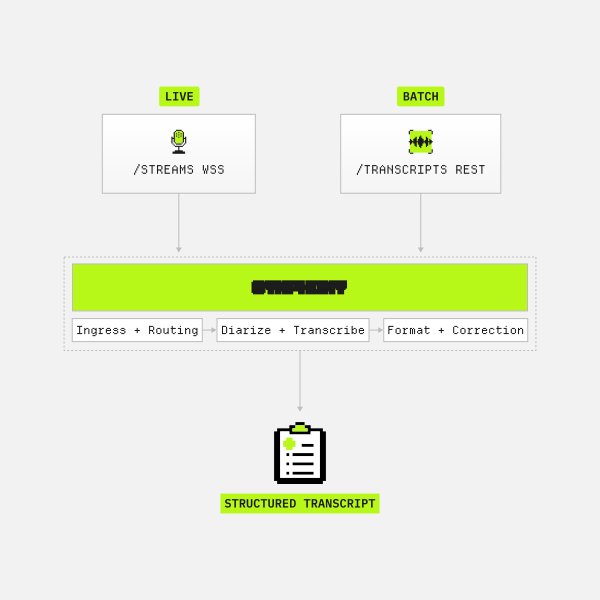
/transcripts is the batch processing endpoint. It accepts uploaded audio files via REST and produces transcripts asynchronously. This makes it appropriate for post-call transcription workflows: recorded consultations, archived telehealth sessions, or any scenario where the audio already exists and does not need to be processed in real time.
The /transcripts workflow involves three sequential API calls: create an Interaction to get an interactionId, upload the audio file via POST /interactions/{id}/recordings/ to get a recordingId, then submit the transcript request via POST /interactions/{id}/transcripts/ referencing both IDs. Each interaction can have more than one audio file and transcript associated with it.
// Step 1: Create Interaction
const {
  interactionId
} = await client.interactions.create({ ... });

// Step 2: Upload audio file
const {
  recordingId
} = await client.recordings.upload(
  createReadStream("recording.mp3"),
  interactionId
);

// Step 3: Request transcript
const transcript = await client.transcripts.create(interactionId, {
  recordingId,
  primaryLanguage: "en",
  diarize: true,
});
Choosing Between Endpoints
The decision comes down to three questions: Is the audio being produced now or was it recorded previously? Is it one speaker dictating or multiple speakers in conversation? Does the application need to react to the transcript in real time?
Generally speaking, if the audio is live and the use case is single-speaker dictation with application control, use /transcribe. If the audio is live and the use case is a multi-speaker clinical encounter with ambient note generation or decision support, use /streams. If the audio is a recorded file and latency is not a constraint, use /transcripts. With this being said though, it's important to assess the solution needed carefully before going with the general recommendations.
Many clinical applications will need both /transcribe and /streams: dictation for provider-driven documentation and ambient streaming for encounter-level capture. Designing the UX so providers understand when to use each mode is as important as the technical integration itself. The dictation and ambient scribe implementation guides cover both workflows in depth.
For any of the three endpoints, the Interaction object is the shared abstraction: it is the container that links audio, transcripts, and any downstream clinical outputs together, and its interactionId is the key passed through the entire processing chain.
For full API specifications, configuration parameters, and code examples, please refer to the Corti API documentation.
More guides to explore
Build faster. Ship safer. Scale smarter.
Get started with healthcare-native APIs built to power real clinical workflows.